





Request More Info
Apply Now
Facebook
Twitter
LinkedIn
Modern Language Association (MLA) Format and Documentation
This web post covers the basics of MLA format and the documentation of sources students frequently use.
For more complete information, refer to the MLA Handbook for Writers of Research Papers, 7th ed.,
available in the Writing Center. The MLA has a brief FAQ page online at http://www.mla.org/handbook_faq
Formatting Your Paper
Margins: One-inch on the top, bottom, and sides of each page.
Page Numbering: Use your word processor to create a header that includes your last name and the page number in the upper right hand corner of the page, one half inch from the top of the page. Every page has this header.
Title Page: MLA style does not require a title page; instead, the first page of the paper should begin
with four lines, double spaced, indicating: your name, name of the course instructor, name of the
course, and the date.
Spacing: Double-space every line (including long quotes and the citations on the Works Cited page).
Indenting: Indent the first line of every paragraph five spaces or one tab. Indent long quotations ten
spaces or two tabs.
Font and Typeface: Use a 12-point font in Times New Roman
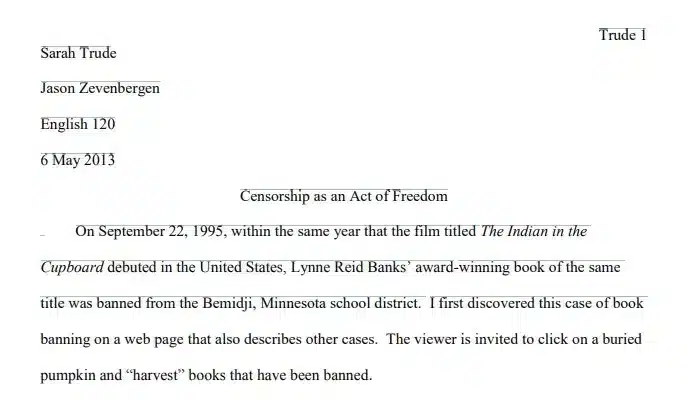
In this example from the first page of an MLA-style paper, the student’s name is Sarah Trude, her
instructor is Jason Zevenbergen, and the course is English 120:

Creating the Works Cited Page
- Continue the page numbering sequence from the main body of your paper.
- Center the words “Works Cited” one inch from the top of the page.
- Continue double-spacing.
- If the citation takes up more than one line of the page, indent the remaining line(s) one-half inch from
the left margin. - Reverse the name of the author: list the author’s last name followed by a comma and the author’s first
name. - Alphabetize the works you cite by the last name of the author. If there is no known author, alphabetize by the first word in the title of the work other than A, An, or The.
An MLA-style works cited page looks like this:

Sample Works Cited Page Entries
Citing Sources in Your Paper
